Apache Kafka
Prefer to learn one decision at a time?
Try questions, reveal the reasoning, trace the code, and finish with the simulator.
Kafka is a distributed event-streaming platform. Producers append records to named topics, topics are divided into ordered partitions, and consumers read those records at their own pace. Kafka retains records after they are read, which makes lag, replay, and several independent consumer groups possible.
What is Kafka?
Kafka places a durable log between applications that create events and applications that react to them. The producer does not need to wait for every consumer, and one consumer does not control whether another can read the same record. That separation is the central idea; partitions, offsets, and consumer groups are the mechanics that make it practical at scale.
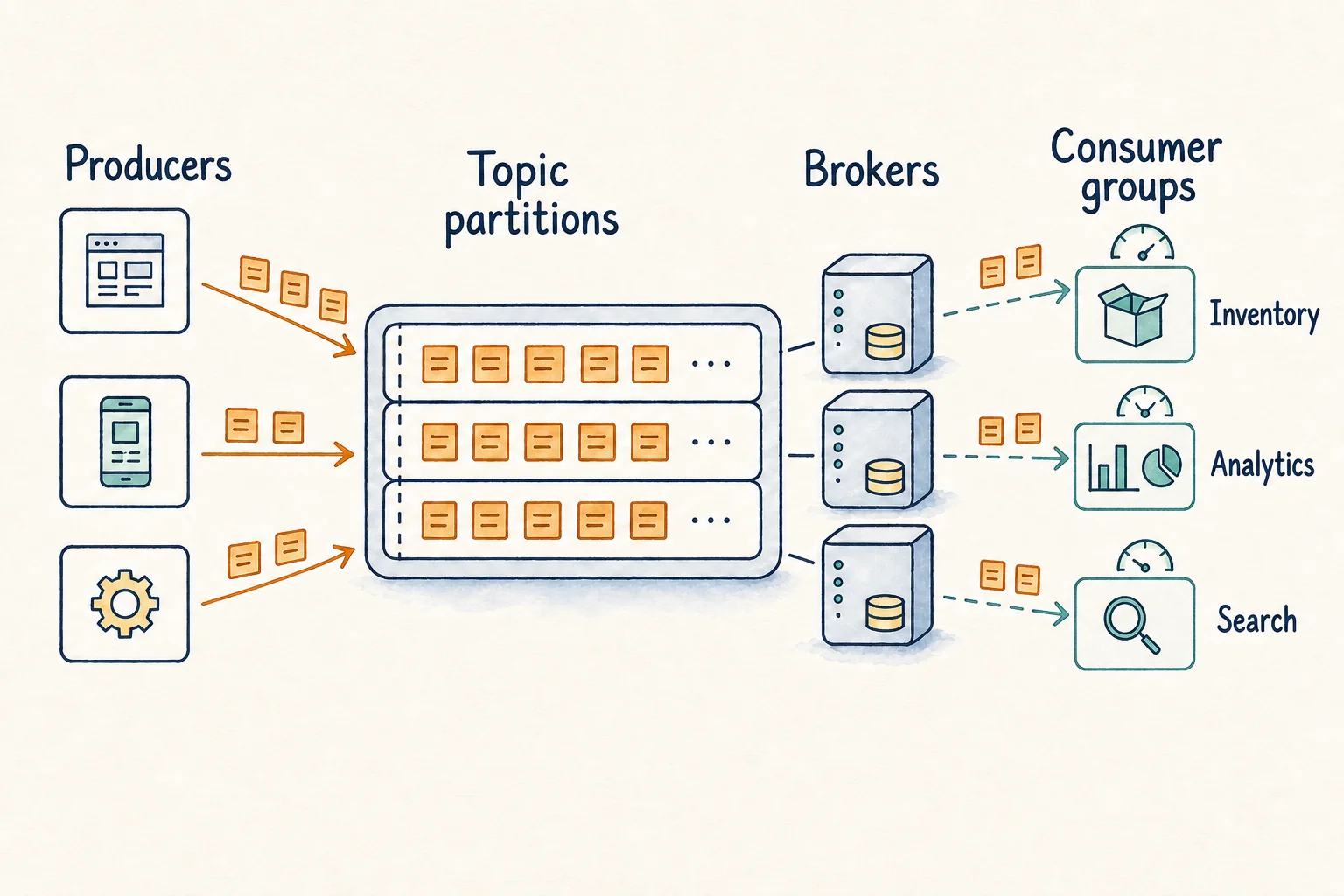
The producer and consumer are decoupled by a durable partition log. Reading a record does not delete it.
Motivation
Before a shared event stream, a service often called every downstream system directly. Adding another consumer meant changing the producer, and one slow dependency could delay the original user request. Teams also polled databases for changes, repeating queries and making missed updates difficult to replay.
Kafka filled the gap between synchronous service calls and a database containing only current state. Producers publish an event once; Kafka retains it; consumers decide when to read it and remember their own progress.
Every producer knows every downstream service.
A slow dependency blocks or fails the caller.
Each consumer repeatedly asks whether data changed.
Polling wastes work and makes replay awkward.
Producers append once; consumers read independently.
Records remain available for lagging groups and replay.
Kafka retains events, but an application database still owns current business state.
Retries can duplicate external side effects unless the consumer or destination is idempotent.
One low-volume worker often needs SQS or RabbitMQ, not a streaming platform.
Kafka orders records inside one partition, not across every partition in a topic.
Key terminology
These terms are enough to follow the rest of the lesson.
- Record
- One event containing a key, value, timestamp, and optional headers.
- Producer
- An application that publishes records to Kafka topics.
- Topic
- A named stream of related records.
- Partition
- One ordered append-only log within a topic.
- Key
- A value commonly used to route related records to the same partition.
- Broker
- A Kafka server that stores partitions and serves reads and writes.
- Leader
- The replica that handles writes for one partition.
- Follower
- A replica that copies the partition leader's log.
- Consumer
- An application that reads records from topic partitions.
- Consumer group
- Consumers cooperating so each partition is assigned to one member in that group.
- Offset
- A record's position in one partition; a committed offset controls where consumption resumes.
- Lag
- The records available after a consumer group's current position.
- Retention
- How long or how much Kafka keeps records, independent of whether they were read.
- Replay
- Reading retained records again from an earlier offset.
Core mechanics
Append-only log; ordering is local to this log.
Routes related records to the same partition.
A leader accepts writes; followers copy its log.
Splits partitions across cooperating consumers.
Marks where one group should resume reading.
Keeps records after reading so they can be replayed.
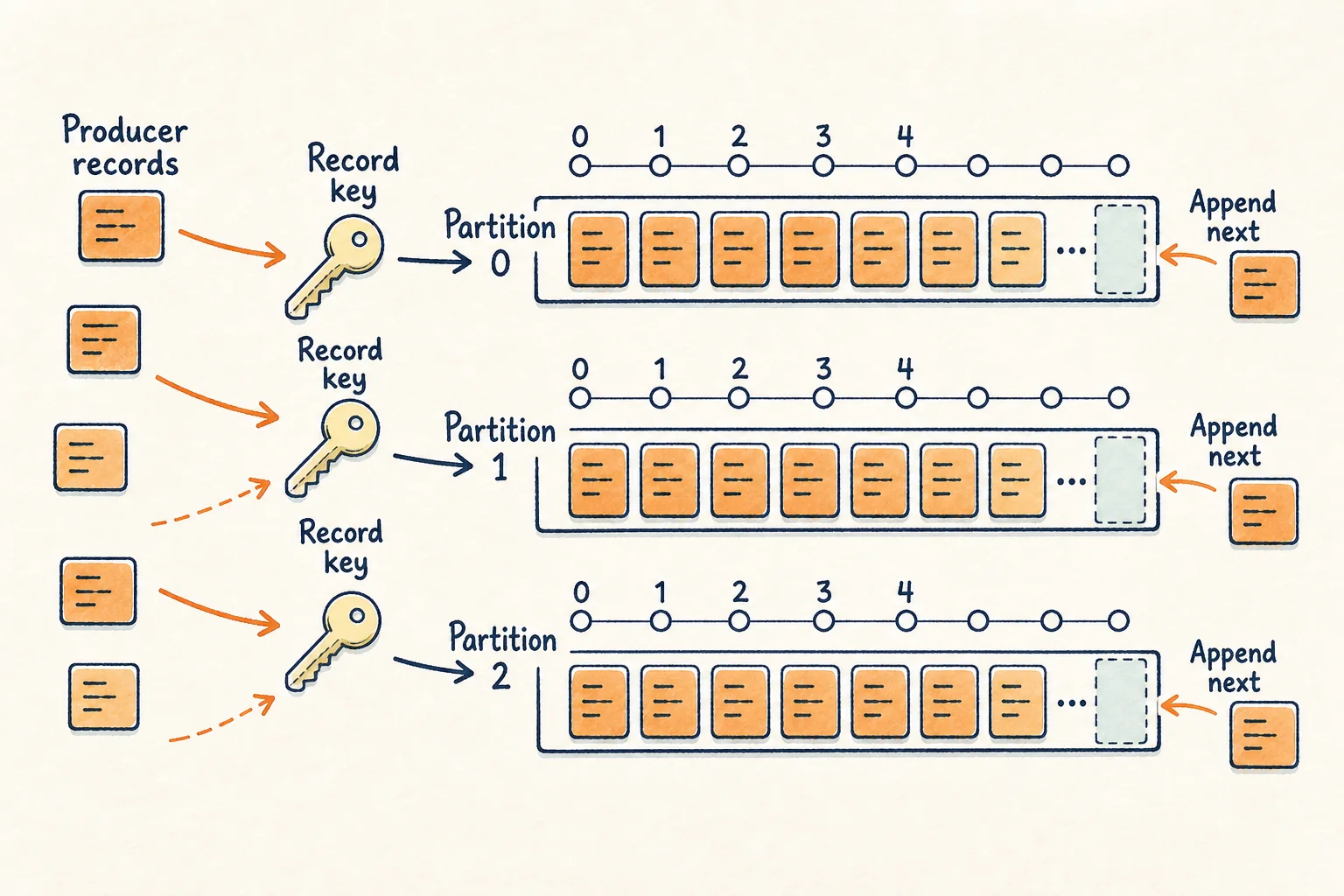
Partitions, keys, and ordering
- A topic is divided into partitions so storage and consumption can scale across brokers.
- A partition is an append-only log. New records receive increasing offsets.
- Records sharing a useful key, such as
orderId, are commonly routed to the same partition. - Kafka guarantees order within one partition, not one global order across the whole topic.
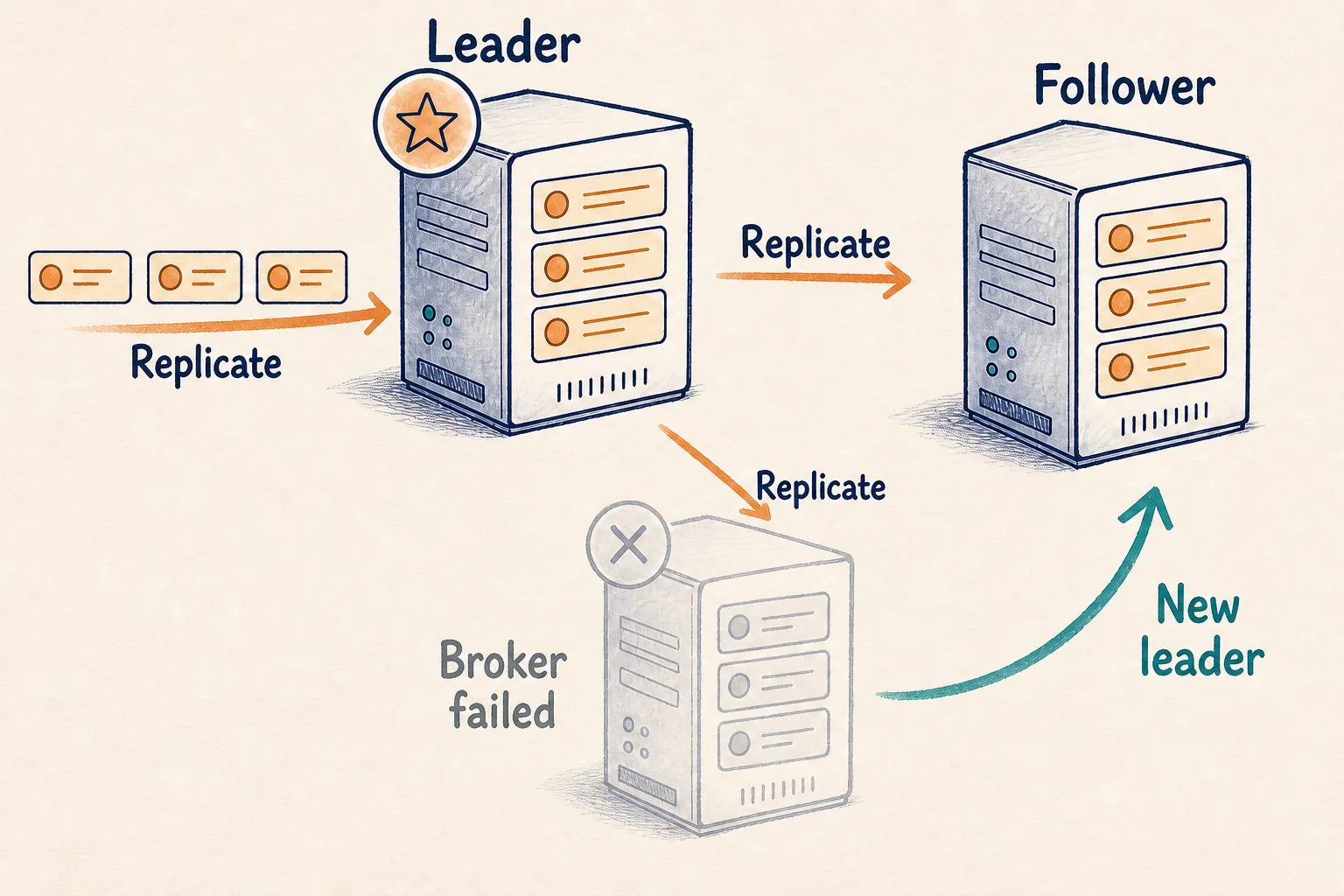
Replication and broker failure
- One replica leads each partition and handles its writes.
- Followers copy the leader's log.
- When the leader fails, an eligible healthy replica can take over.
- Durability also depends on acknowledgement configuration and replica health; replication factor alone is not a universal guarantee.
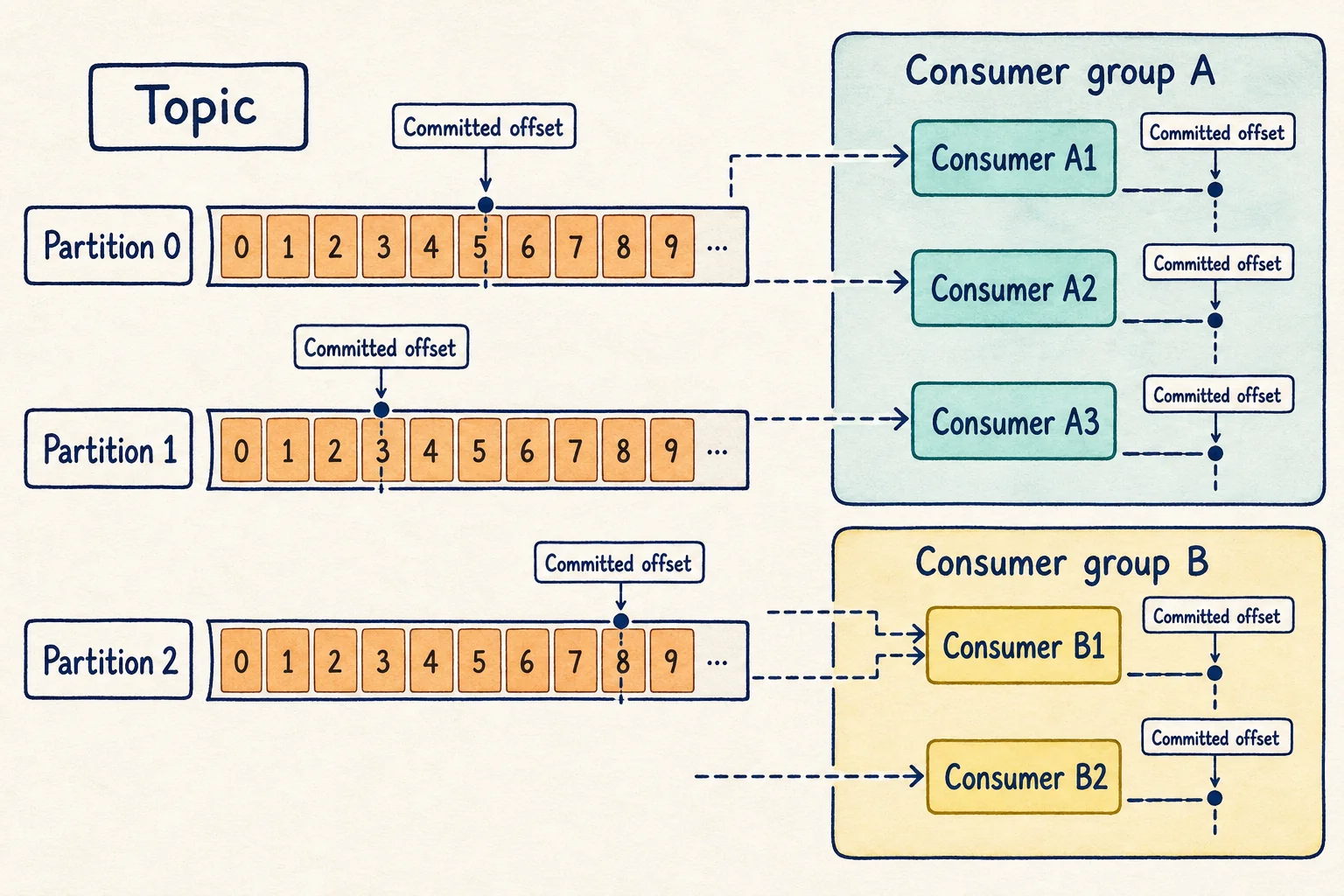
Consumer groups, offsets, and replay
- Inside one consumer group, a partition is assigned to one active consumer at a time.
- More consumers help only while there are unassigned partitions; extra consumers remain idle.
- A separate group can read the same topic with its own committed offsets.
- The committed position is where a restarted consumer resumes.
- Retention keeps records independently of consumption, so a group may reset an offset and replay retained history.
Swipe to follow the flow →
Delivery semantics
Use-cases
1. Order event fan-out
An accepted order must update inventory, start shipping, and feed analytics. Kafka fits when these capabilities should consume the same event independently and a slow consumer must not block the others.
For example, the Order Service publishes ORDER_CREATED { orderId: "ORD-101", customerId: "C-44", amount: 2500 } to order-events. Inventory, payment, shipping, notifications, and analytics use separate consumer groups. Each group advances at its own pace, so a delayed shipping consumer does not hold up inventory or the customer response.
Use orderId as the key when per-order sequence matters. That keeps ORDER_CREATED, PAYMENT_COMPLETED, and ORDER_SHIPPED in one partition and therefore in one readable order. Consumers must still make external effects idempotent because a retry may deliver the same event again.
Choose Kafka when: several independent capabilities need the event, lag must be recoverable, or a new consumer should replay history. Choose something simpler when: one background worker needs one disposable task and no replay; a managed queue is usually easier.
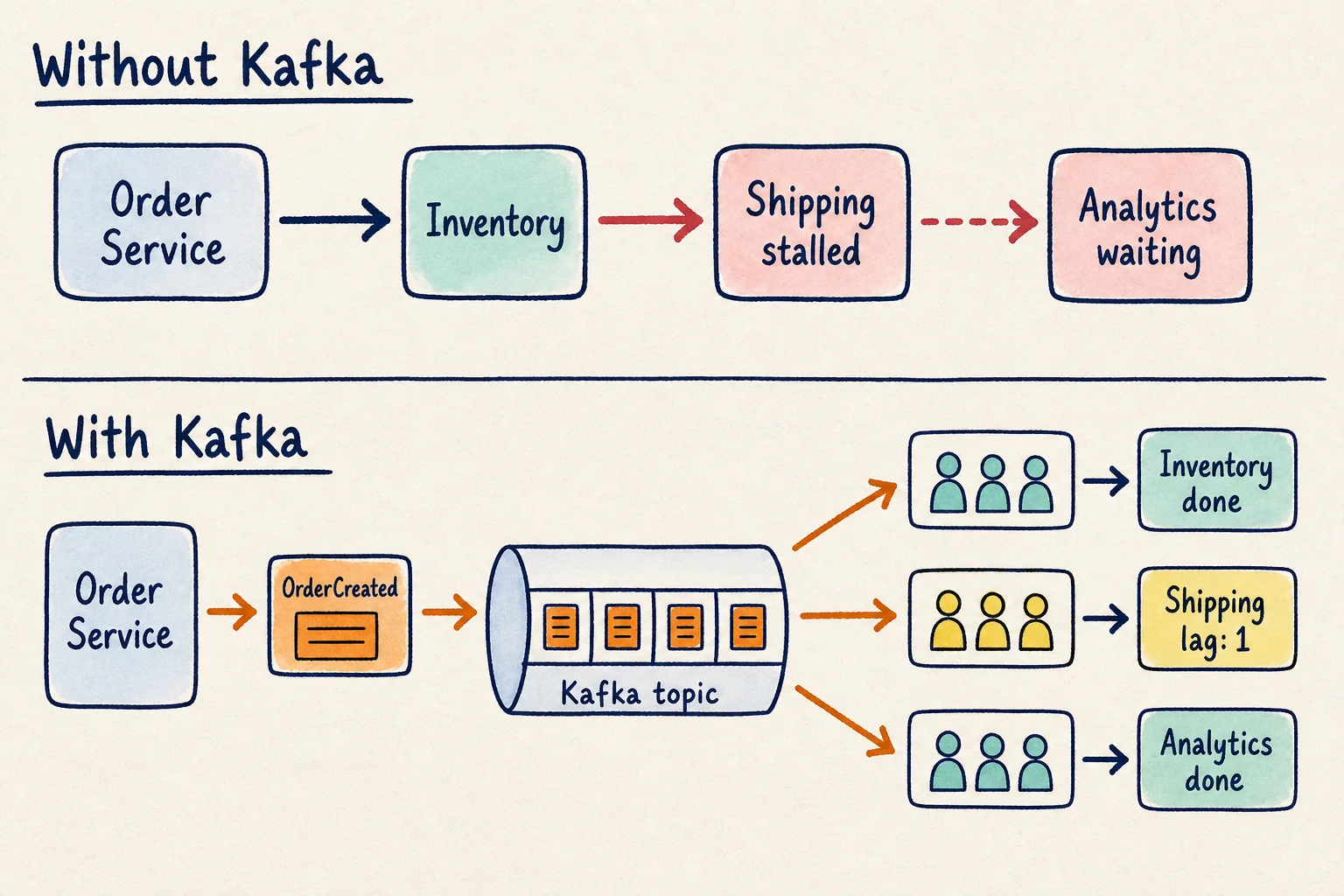
Order event fan-out
Watch one retained event move independently through three consumer groups.
Ready
The order service is ready to publish one OrderCreated event.
Order Service
ready
Kafka · orders P0
waiting for event
Inventory
idle
Shipping
idle
Analytics
idle
2. Activity analytics
A product emits a continuous stream of clicks and views. Kafka can absorb a burst, partition by userId, and let consumers drain lag while preserving each user's event order inside one partition.
Imagine a shopping app publishing PRODUCT_VIEWED, SEARCH_PERFORMED, ADD_TO_CART, and PURCHASE_COMPLETED. Recommendation, marketing, fraud, and reporting consumers can all read the same activity without the web request waiting for them. If an analytics bug is fixed tomorrow, that consumer can reset its offset and replay the retained events.
Keying by userId keeps one user's journey together, but Kafka does not create one global order across all users. Partition count and consumer capacity should match the sustained event rate, while lag shows whether processing is falling behind.
Choose Kafka when: events arrive continuously, bursts are expected, and several real-time consumers need the stream. Choose something simpler when: 200 rows arrive once each night and a direct batch load meets the freshness requirement.
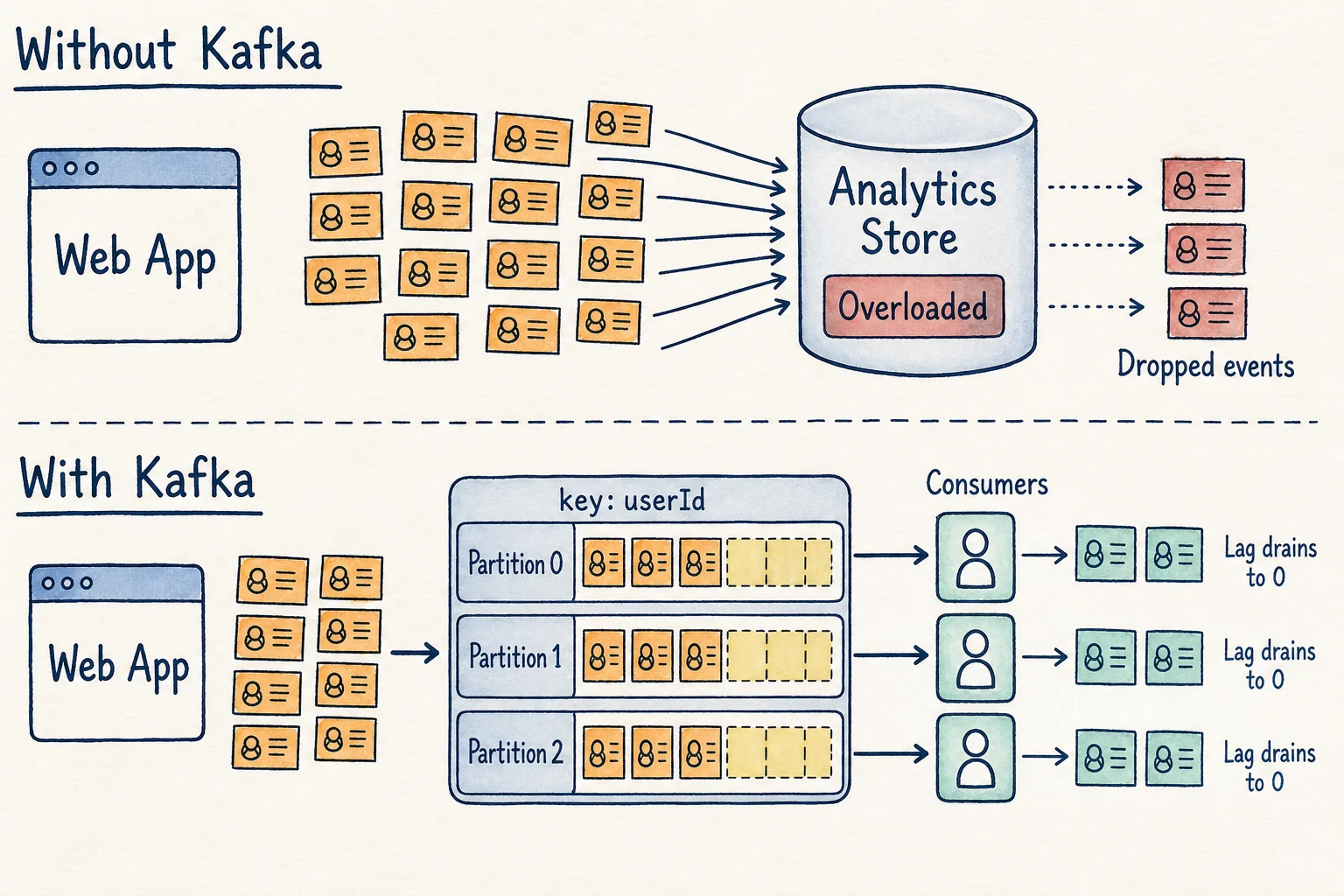
Activity analytics burst
Change the burst and partition count, then watch keyed records build and drain lag.
Burst ready
8 activity events are ready. Kafka will partition them by userId.
Web App
burst ready
Kafka · activity
lag P0:0 · P1:0 · P2:0
Analytics
0 processed · lag 0
3. Change-data capture
Search, cache, and analytics often need database changes. A CDC process can publish committed changes to Kafka so each target applies them independently and replays anything missed during an outage.
Suppose the Products database commits a price change for product P-42 from ₹999 to ₹899. The CDC connector publishes the committed row change to product-changes; search updates its document, cache invalidates the old value, and the warehouse records the new version. If search is offline, the database transaction still succeeds and search catches up from its stored offset later.
The database remains the source of truth. Kafka carries the change history, and each target must apply repeated records safely. Kafka Connect is useful when standard source and sink connectors can replace several custom integration jobs.
Choose Kafka when: multiple targets need a durable, replayable stream of committed changes. Choose something simpler when: one small local index can be updated reliably in the same process or a scheduled batch is sufficient.
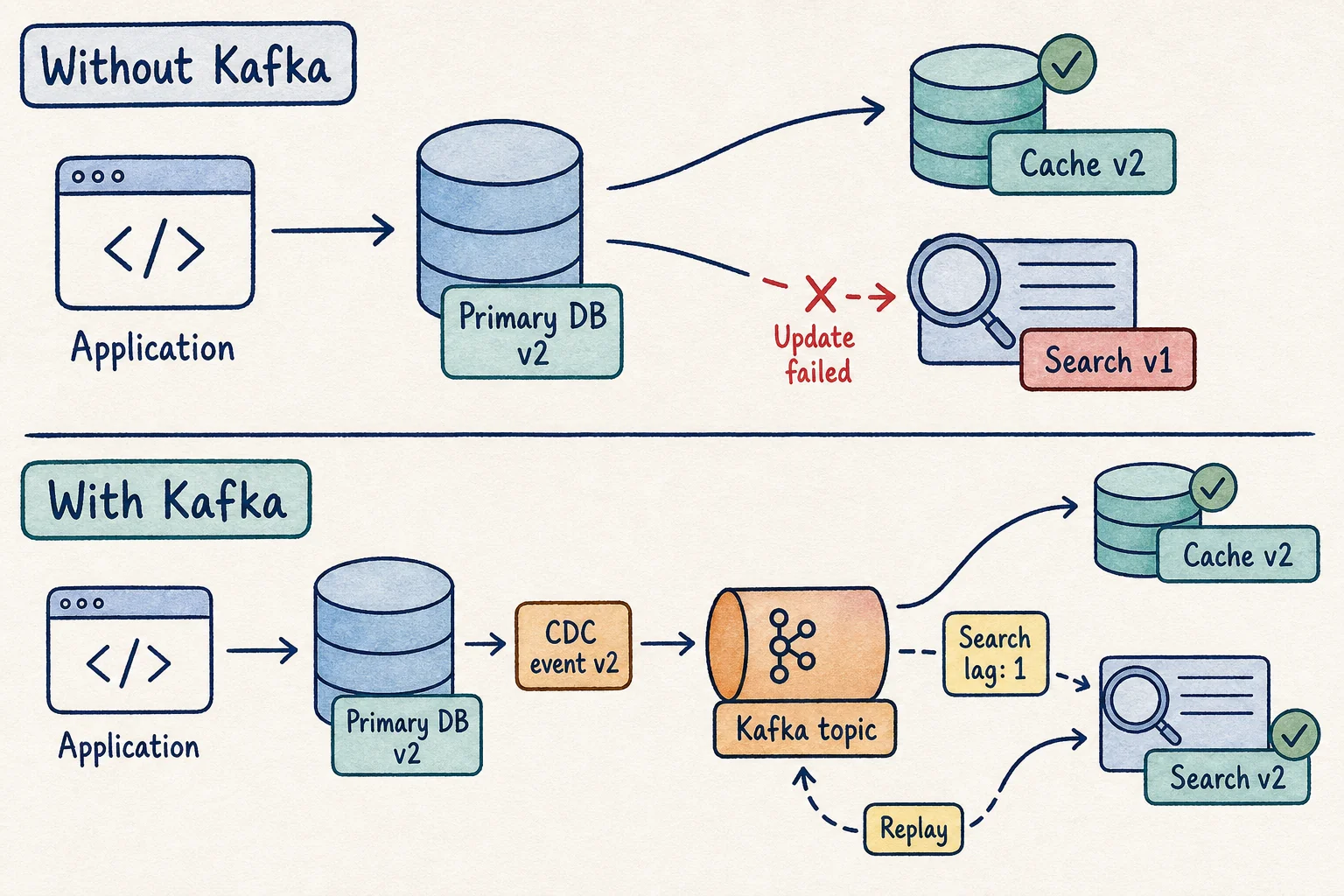
Change-data capture
Pause Search, retain the database change, then replay it from the committed offset.
Consistent starting point
The database, Search, and Cache all show customer version 1.
Primary DB
version 1
Kafka · changes
waiting for CDC
Search
version 1 · lag 0
Cache
version 1
4. Traffic-spike buffering
Producers sometimes create work faster than workers can finish it. Kafka can accept the burst and expose lag while consumers drain the retained backlog at a steady rate.
Imagine 100,000 ticket requests arriving in two minutes while booking workers can safely validate only 2,000 requests per minute. Producers append requests quickly, the consumer group's lag grows, and workers continue at the rate the booking database can sustain. Adding consumers increases throughput only while enough partitions are available.
Kafka separates arrival rate from processing rate, but it does not prevent double booking or reserve inventory by itself. The booking store still needs an atomic reservation rule, and users still need an honest pending or rejected result.
Choose Kafka when: the burst must be retained, lag must be observable, and replay or ordered histories matter. Choose something simpler when: ordinary independent jobs only need durable background execution; a managed work queue is usually the clearer tool.
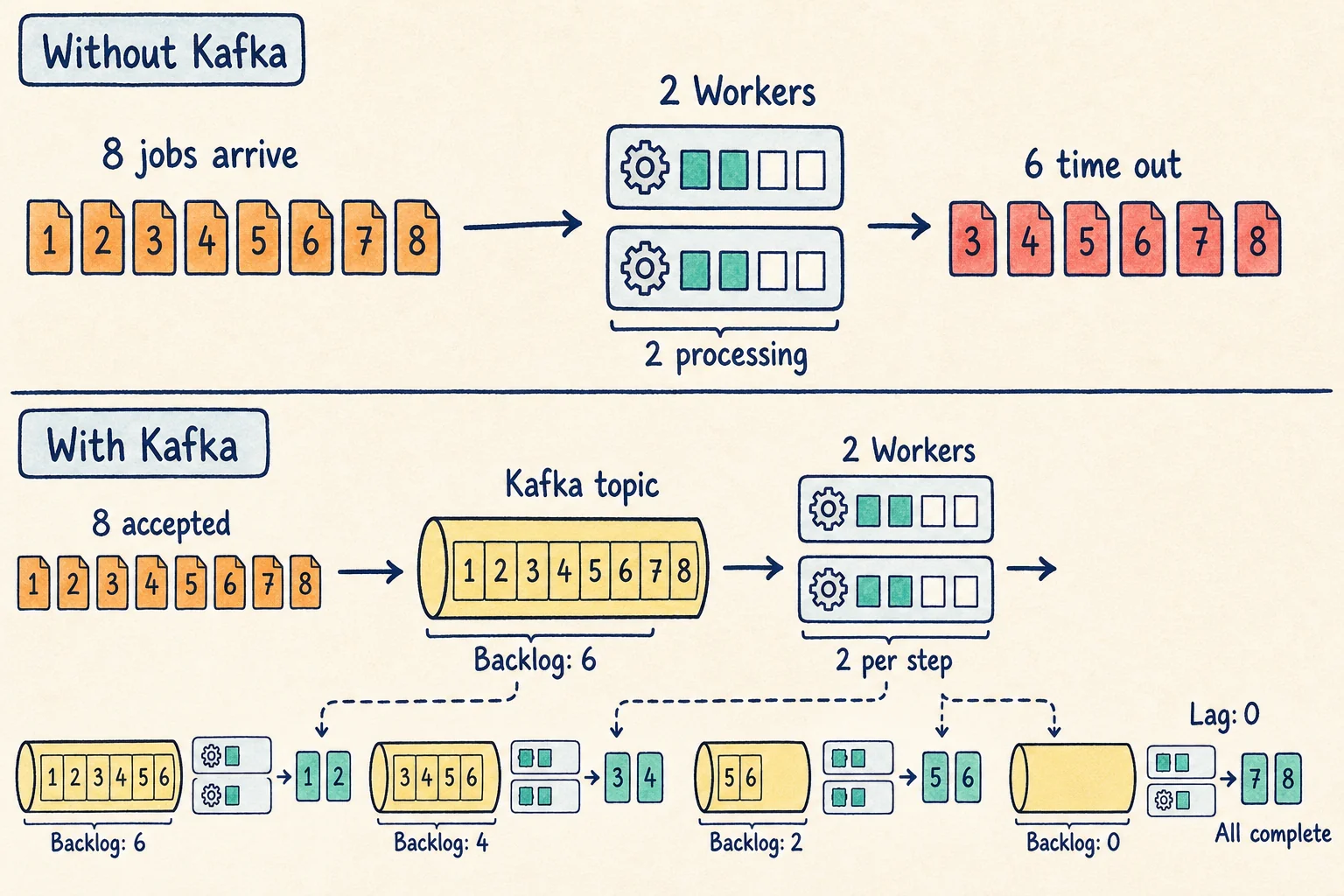
Traffic-spike buffering
Tune the burst and worker capacity, then watch Kafka retain and drain the backlog.
Burst ready
8 jobs are ready while workers can finish 2 per beat.
Producers
8 ready
Kafka · jobs
offset 0 · lag 0
2 Workers
0 complete
More common uses from the same mechanics
The next examples do not require a new Kafka concept. They reuse the same partitioning, independent consumer groups, retention, offsets, replay, and stream-processing boundaries from the four core scenarios.
Example: CARD-11 produces five payments from three countries within two minutes.
Why Kafka: A stream processor groups by card, evaluates a time window, and publishes a SuspiciousActivity event as new payments arrive.
Boundary: Blocking a payment is an external side effect, so retries and false positives still need deliberate handling.
Example: Payment, order, and authentication services publish errors with a shared requestId.
Why Kafka: Search, security, alerting, and archive consumers can read the same retained stream independently.
Boundary: A small application with one log destination may be simpler with a direct collection agent.
Example: Delivery vehicle V-18 reports location, speed, and engine temperature every five seconds.
Why Kafka: Keying by vehicleId preserves each vehicle's reading order while map, ETA, and maintenance consumers scale separately.
Boundary: Kafka transports telemetry; it does not replace device command protocols or a queryable time-series store.
Example: PAYMENT_COMPLETED triggers an email, SMS, and push notification workflow.
Why Kafka: The payment service publishes once, while notification consumers retry provider failures without blocking payment completion.
Boundary: Consumers need an event ID or another idempotency check to avoid duplicate external messages.
Example: ACCOUNT_OPENED, MONEY_DEPOSITED, and MONEY_WITHDRAWN explain how a balance reached ₹800.
Why Kafka: Retained ordered events can rebuild derived views and support investigation or controlled replay.
Boundary: Configure retention deliberately and keep a separate compliance archive or business source of truth when required.
Example: Committed product changes flow from a database to search, a warehouse, and object storage.
Why Kafka: Kafka Connect source and sink connectors move large continuous datasets without every application owning custom integrations.
Boundary: A small nightly file or one local target may be clearer as a direct batch load.
Example: An India Kafka cluster mirrors selected topics and consumer positions to a US recovery cluster.
Why Kafka: MirrorMaker can replicate topics and related metadata for migration, regional access, or disaster recovery.
Boundary: Replication does not resolve conflicting business writes or replace a tested failover plan.
Likely interview questions
- 1Why does Kafka partition a topic?
- 2What ordering does Kafka guarantee?
- 3How do consumer groups scale consumption?
- 4What happens when processing succeeds but offset commit fails?
- 5When is Kafka a worse choice than a queue or database?
A strong answer starts with the requirement, names the Kafka mechanic that satisfies it, and finishes with the cost or boundary. For example: “We need several independent consumers and replay, so a retained partitioned log fits. We key by orderId for per-order ordering. Consumers are at-least-once, so external effects must be idempotent.”
TL;DR recap
- A topic is split into ordered partition logs.
- Keys keep related records in the same partition.
- Replication protects partition availability.
- Consumer groups divide partitions, while separate groups read independently.
- Committed offsets enable restart, lag tracking, and replay.
- Do not use Kafka when a simple low-volume queue or direct call solves the problem.
Source note: mechanics and guarantees were checked against the current Apache Kafka documentation, including its guidance for Kafka Connect, Kafka Streams, and geo-replication. The simulators deliberately simplify networking and storage while preserving the decision-relevant behavior.